Editorial
Regulated for Medicine, Unregulated for Data: What Pharmacies Do With Your Consent
June 03, 2026
Editorial
You open a website expecting it to load instantly. Instead, you stare at a blank page while the spinner keeps spinning. A headline appears. Then disappears. Then the page shifts around while something else loads.
After a few seconds you give up, close the tab, and try another site.
If you’ve been asking yourself why does the internet feel slow, you’re not imagining it. Many people assume the problem must be their broadband, their Wi-Fi, or their computer. But in most cases, why are websites slow has very little to do with your internet connection.
The real reason sits in the background of almost every webpage you visit.
When a website loads slowly, most people blame their internet plan or their router.
But modern broadband connections are rarely the bottleneck. Even average home internet speeds today are more than fast enough to load a webpage quickly.
The real delay usually comes from something else: third-party scripts running before the page can fully appear.
Most websites no longer load just one thing. When you open a page, your browser isn’t simply downloading the article or video you want. Instead, it begins contacting dozens of different servers across the internet.
These background requests happen before the page can fully render. Many of them have nothing to do with the content you came to see.
They are scripts added for advertising systems, analytics tools, social media integrations, marketing platforms, and various tracking technologies. Each one adds more work for your browser to do.
And the more scripts that load, the longer the page takes to appear.
When you type a URL and press Enter, several steps happen almost instantly.
First, your browser asks the Domain Name System where the website lives. Then it contacts the server hosting the page and downloads the basic HTML structure.
At that point, the browser should theoretically be able to show the page.
But instead, the browser discovers dozens of additional instructions embedded in the page. These instructions tell it to fetch resources from other domains: advertising networks, analytics providers, social media platforms, and marketing tools.
This process can quickly multiply.
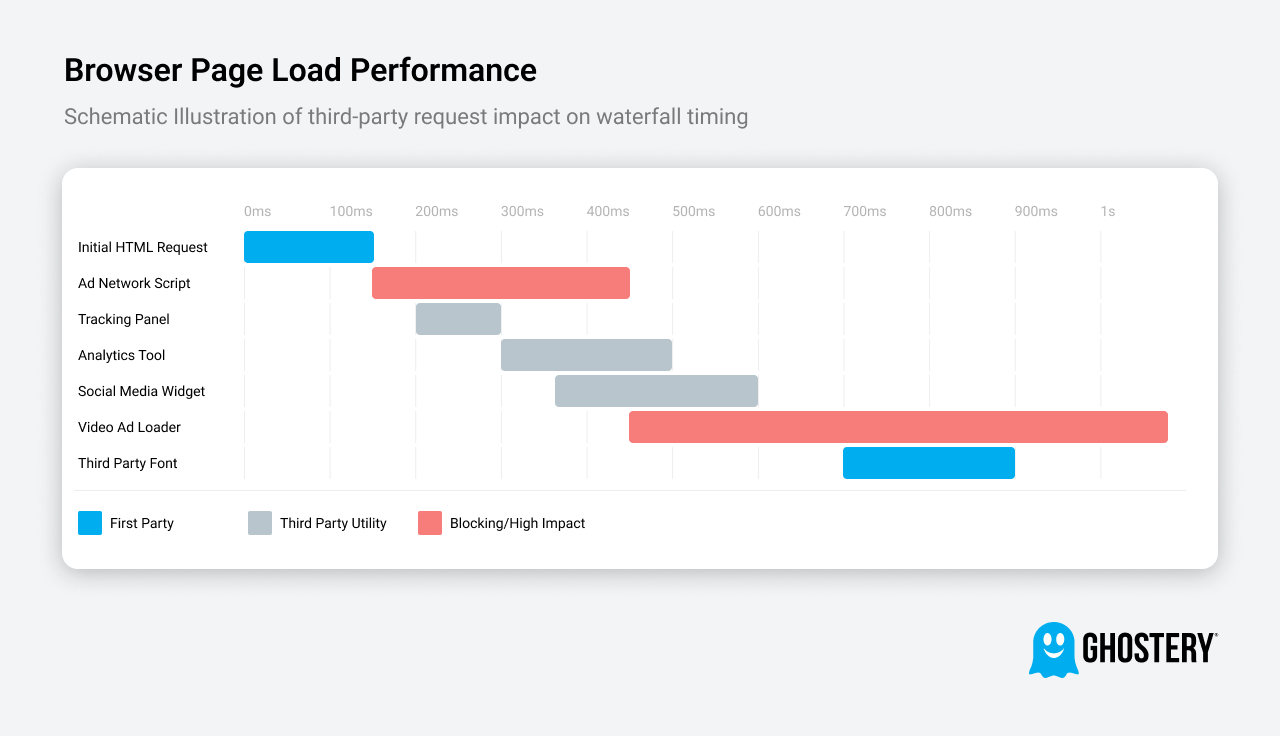
You arrived at a page expecting one request. Instead, your browser may suddenly be handling dozens. According to the HTTP Archive Web Almanac, the average webpage now makes over 70 third-party requests before the main content renders.
A simple analogy is ordering a coffee at a café and having twelve different salespeople approach your table before the barista even starts preparing your drink.
You came for one thing, but everything else happens first.
The modern web evolved around advertising and marketing technology.
Over time, websites began embedding more tools to understand their visitors, measure engagement, and serve targeted ads. A single advertising platform might install multiple scripts. Analytics tools add more. Social sharing buttons introduce additional connections.
Often these tools are installed through plugins or marketing dashboards. Website owners might add a new feature without realizing it triggers several new background requests.
The result is that many sites are running far more external scripts than their creators realize.
The slowdown isn’t always intentional. But the effect is the same.
Pages become heavier. Browsers work harder. And loading takes longer.
Once you know they exist, you start seeing the pattern everywhere.
A webpage may appear simple on the surface, but underneath it can be pulling resources from dozens of external companies.
These scripts serve different purposes, but many of them compete for your browser’s attention before the page can fully load.
Understanding them explains why trackers slowing down pages has become such a common experience online.
Not all scripts have the same impact on performance. Some are small and quick. Others are surprisingly heavy.
Here are the categories that typically slow pages the most:
Video advertising scripts
These are among the heaviest elements on a page. They often load multiple ad exchanges simultaneously while preparing video playback.
Retargeting pixels
Small pieces of code used by advertising networks to track user behavior across websites.
Third-party fonts
Many websites load fonts from external servers rather than hosting them locally, which creates additional requests before text can render.
Social media widgets
Buttons like “Share on Facebook” or embedded feeds require scripts from social platforms before they appear.
Each of these elements may seem small individually. But when dozens of them run together, they significantly increase page load time.
It’s easy to assume slow pages mean the website is poorly built or intentionally overloaded.
But that’s often not the case.
Modern websites rely on layers of external services. A marketing team might install a plugin for analytics. Another team adds an advertising network. A social sharing tool gets integrated later.
Each tool brings its own scripts and connections.
Over time, these layers accumulate until a page contains far more background activity than anyone originally planned.
The slowdown isn’t always visible to the people managing the site. But your browser still has to deal with it.
If the problem isn’t your internet connection, upgrading your broadband won’t solve it.
Instead, improving browsing speed often means reducing the number of scripts your browser needs to load.
There are several practical ways to do that.
One of the most effective ways to speed up browsing is preventing unnecessary third-party scripts from loading at all.
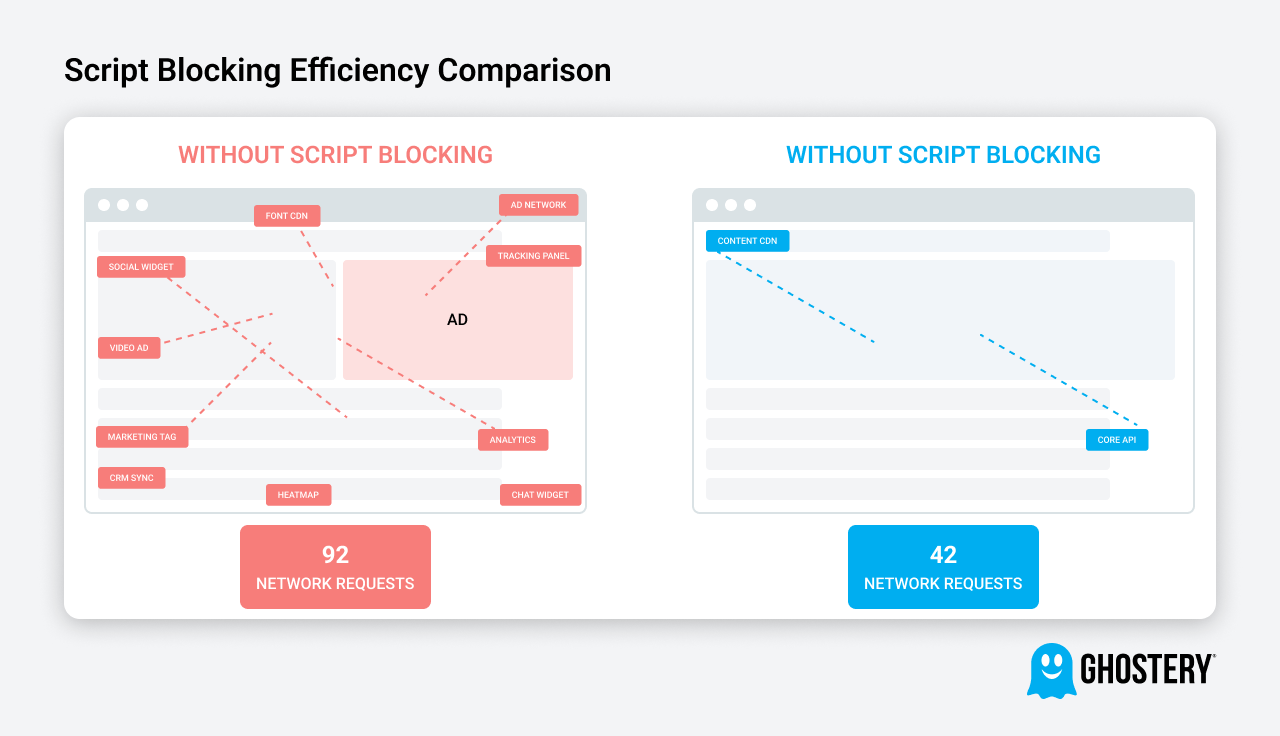
Ghostery works by identifying and blocking third-party scripts before the browser requests them — which means they never slow the page down in the first place. Unlike an extension that hides ads after loading them, Ghostery stops the request entirely. Fewer requests means faster pages.
Studies and internal benchmarks consistently show that pages with tracker blocking enabled load significantly faster, often reducing network requests by 30–50% per page.
Because fewer scripts are running in the background, the browser can render the page content sooner.
While scripts are often the biggest factor, a few additional adjustments can also help improve browsing speed.
Review your extensions
Too many extensions running simultaneously can compete for browser resources.
Reduce open tabs
Modern browsers isolate tabs for stability, but dozens of active tabs still consume memory.
Keep your browser updated
New browser versions frequently include performance improvements and faster rendering engines.
Together, these changes can noticeably improve browsing responsiveness.
If the internet has been feeling slower lately, the issue probably isn’t your connection.
Modern webpages have simply become much more complex than they used to be.
Behind the scenes, dozens of external scripts compete for your browser’s attention before the content you actually want appears.
Once you understand that, the solution becomes surprisingly simple.
Reduce the number of unnecessary scripts loading in the background, and pages start appearing faster again.
For many people, speeding up browsing is less about upgrading internet plans and more about controlling what runs in the browser in the first place. Ghostery is free, takes 30 seconds to install, and most people forget it's even there — which is exactly the point.
Kinda spoils me. I mainly use FF, but occasionally use other browsers. When I switch, I realize how much junk Ghostery removes.

 5.0
•
Firefox Browser ADD-ONS
5.0
•
Firefox Browser ADD-ONS
Ghostery is a critical addition to my browsing life at this point. I can't imagine using the internet without it, with all its annoying ads and popups. I don't think of it very often because Ghostery does its job so silently and seamlessly.
 5.0
•
Chrome Web Store
5.0
•
Chrome Web Store
The internet is substantially less annoying with Ghostery enabled.
 5.0
•
Firefox Browser ADD-ONS
5.0
•
Firefox Browser ADD-ONS